






How to Use Same WhatsApp Account on Multiple Devices
If you have more than one phone, for instance, for personal and official use and work with multiple numbers, syncing information between devices may be difficult. But one thing you should know about...


If you have more than one phone, for instance, for personal and official use and work with multiple numbers, syncing information between devices may be difficult. But one thing you should know about tech companies like WhatsApp is that they constantly strive to discover solutions to every problem their customers’ experience.
Table Of Content
This is what WhatsApp is currently doing as it rolled out a feature on its app for users to be able to add and sync their WhatsApp accounts on multiple devices.
With this WhatsApp feature, users will no longer need to download clone apps as it will completely revolutionize how individuals access their WhatsApp accounts across several devices. This moves the app closer to Telegram, a rival network that has provided the services for as long as it has.
But how can this feature be used?
How to use the feature on the Web
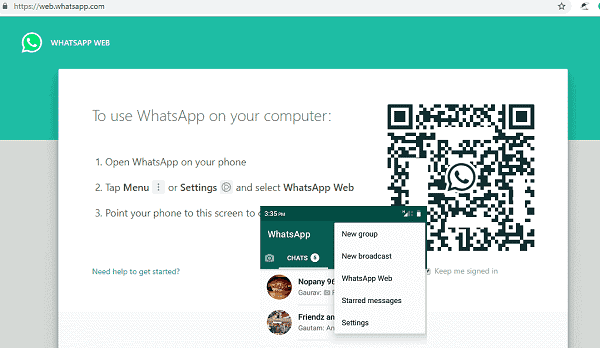
Download the app on your smartphone. Once that has been installed, tap the menu or settings or the three-dotted icon on the top right-hand corner and select linked devices. Click on the link a device option, it will open a camera to scan a QR code.
Once you are at that stage, open web.whatsapp.com on your laptop or computer, and you will see a QR code. Use your phone to scan the QR code, and automatically sync all information, chat history, and contacts to your laptop or computer.
How to use the feature on multiple phones
Download WhatsApp on both devices. You obviously need to have the apps already to use the feature. But when downloading, make sure to install the latest version of WhatsApp on the second smartphone.
Once the app has been installed, open the app on the second smartphone. Click on the three-dot icon on the right top corner of the screen and select the link a device option. It will bring out a QR code.

Now, back to the primary smartphone, go to the settings, select linked devices, and point the primary smartphone camera at the QR Code on the second smartphone. You might have to wait a while for the synchronization to be completed. This will involve chat history, calls, and other data automatically syncing between the two smartphones.
After this, both devices can work independently, although there might be some feature restrictions, particularly broadcast lists or status posting. These features might not be available for the second device according to TechWeez. It can sync without an internet connection.
Who can use the feature?
The ‘Companion’ feature was earlier released to a limited number of users using the beta version. It is now available to all beta testers who install the latest WhatsApp beta version on their Android phone through the Google Play Store.
For the iOS gang, WhatsApp hopes to make it available soonest. However, you can link an Android phone if you have an iPhone.
technext


No Comment! Be the first one.